


Every document editor makes a promise to the writer: what you see is what you mean (get). When spacing drifts, text shrinks at deeper nesting levels, or interface elements float out of position, that promise quietly breaks. The writer may not be able to name what is wrong, but they feel it - the layout looks off, and confidence erodes.
We recently revisited the rendering foundations of our editor and found five visual issues that had accumulated over time. Each one was small on its own. Together, they created a compounding sense of inconsistency that undermined the editing experience.
This is the story of how we fixed them - and the single principle that unified all five changes.
What We Found
The issues fell into a pattern: each one violated the spatial contract between blocks at different depths and types.
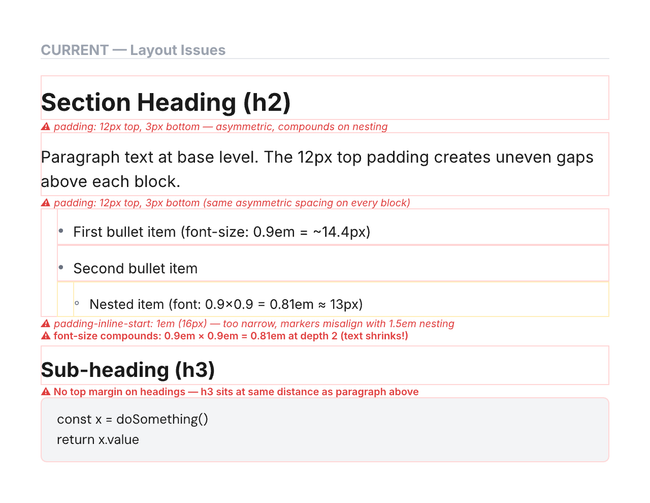
Uneven vertical rhythm. Blocks had more space above them than below, creating a lopsided cadence as content grew. The gap above a paragraph was four times the gap below it. For a single block this is barely perceptible, but across a full document the cumulative effect made the page feel top-heavy.
Shrinking text at depth. Nested content - a bullet list inside a quote, or a paragraph inside a toggle - rendered slightly smaller than its parent. And because the scaling was relative, each additional level compounded the reduction. By the third level of nesting, text was noticeably smaller than the root, even though nothing in the document model said it should be.
Misaligned list markers. Bullet points and numbered items did not line up with the nesting indent. The gutter reserved for markers was narrower than the indentation step, so list text started at a different horizontal position than a paragraph at the same depth. This broke the vertical river of content that well-typeset documents rely on.
Flat heading spacing. Every heading - whether a section title or a minor subheading - received the same amount of breathing room. There was no scaling by importance, no collapse rules for consecutive headings, and no suppression of top margin for the first element in a group. The result was spacing that felt arbitrary rather than intentional.
Drifting drag handle. The side menu icon (the 6-dot grid that lets you drag and reorder blocks) was positioned based on assumptions about the old spacing. After the padding changed, it appeared about ten pixels too low — no longer aligned with the first line of text.
The Principle
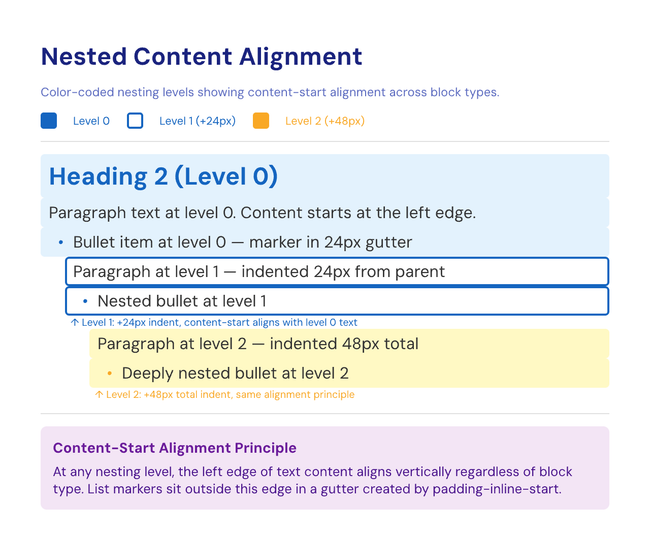
All five fixes follow one rule: at any nesting level, the left edge of text content aligns vertically regardless of block type.
A paragraph, a heading, a bullet item, and a code block at the same depth should all start at the same horizontal position. List markers sit outside this content edge, in a dedicated gutter. Headings get proportional breathing room, but their text still starts on the same vertical line as everything else at that level.
This is the content-start alignment principle. It is the same approach used by Notion, Typst, and Tailwind Typography - and it is the foundation that modern document tools converge on because it produces layouts that feel structured without being rigid.
What Changed
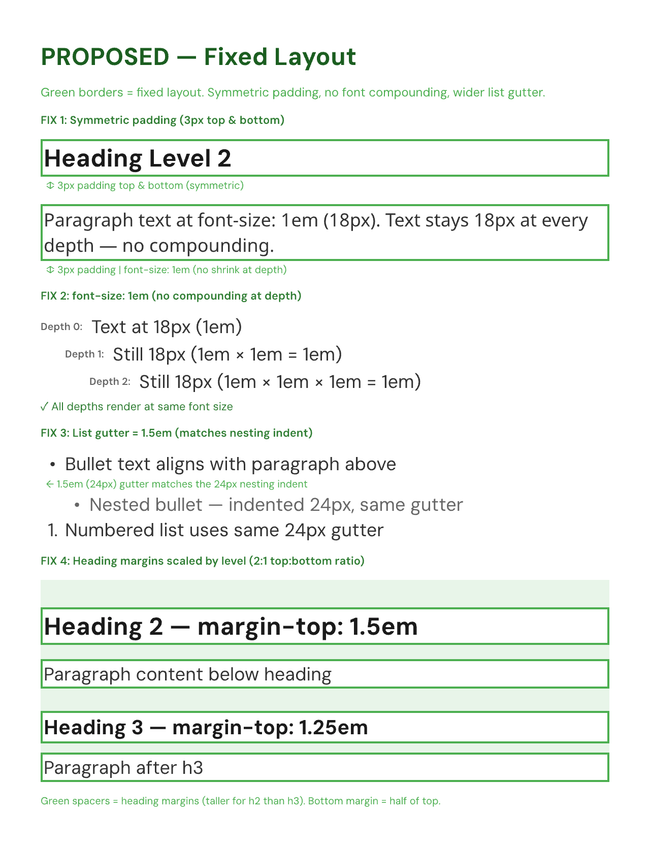
Symmetric block spacing. We replaced the asymmetric top-heavy padding with equal spacing above and below each block. A small sibling margin between consecutive blocks preserves visual separation. The result: blocks stack with a predictable, even rhythm at every depth.
Consistent text size. We removed the relative font scaling on inline content. Text now renders at the document base size regardless of how deeply it is nested. A paragraph three levels deep reads the same as one at the root - because it should.
Matched list gutter. The gutter width for list markers now matches the nesting indent exactly. When you create a bullet list under a paragraph, the bullet text aligns with the paragraph text above it. Numbered items, nested bullets, and mixed lists all follow the same spatial grid.
Scaled heading margins. Headings now receive breathing room proportional to their level. A major section heading gets more space than a minor subheading, following a 2:1 top-to-bottom ratio. Consecutive headings collapse their spacing to avoid double gaps. The first heading in any group suppresses its top margin entirely. This hierarchy of whitespace gives documents a natural visual rhythm that mirrors their semantic structure.
Repositioned side menu. The drag handle now aligns with the center of the first line of text in every block - paragraphs, headings, lists, media, and code blocks alike. The horizontal offset was also adjusted to clear the wider list gutter without overlapping markers. The handle follows the content, not the container.
Why This Matters
These changes are invisible when done right. Nobody opens a document and thinks what excellent vertical rhythm. But they do notice when things are off - when a heading feels cramped, when nested text looks oddly small, or when the drag handle hovers in the wrong spot.
Consistent rendering is a form of trust. It tells the writer that the tool understands the structure they are building, and it tells the reader that the content was crafted with care. By committing to content-start alignment as an invariant - not just an aspiration - we have given both writer and reader a more reliable foundation.
The editor should disappear into the writing. These five fixes help it get closer to that goal.
You can see the changes made in this PR: https://github.com/seed-hypermedia/seed/pull/399
Photo by Shubham Dhage on Unsplash
Do you like what you are reading? Subscribe to receive updates.
Unsubscribe anytime