

Context
Three planning docs (editor-big-plan.md, plan-editor-document-features.md, plan-editor-migration-steps.md) describe the same vision: use the editor to render all document content (read-only and editable), replacing BlocksContent entirely.
The document lifecycle machine (XState v5) is already built and wired into resource pages on branch unified-document-lifecycle-machine. This plan merges all three docs into one.
Key Decisions
Extensions before swap: Core extensions must reach feature parity before replacing BlocksContent
Single editor instance: Toggle isEditable rather than swapping components
renderType + editable: Constructor takes { renderType: 'document' | 'embed' | 'comment', editable: boolean }. renderType is context metadata; plugin loading controlled by editable only (for now)
Core 4 extensions + Supernumbers: Block Highlighting, Image Gallery, Hover Actions, Range Selection, Supernumbers — Collapsed Blocks deferred
Editing blocked on renderer swap: In-place editing only after editor is the renderer
Click-to-edit: Single click on text block or bottom empty area enters edit mode (not a button). Click-drag = text selection (shows range selection bubble), NOT edit trigger
Draft auto-load: If user has edit access and a draft exists, show draft in edit mode automatically
Account switching: Save draft + exit edit mode when switching to non-editor account; enter edit mode (or allow it) when switching to editor account
Supernumbers: Top-right of block, shown in all modes when count > 0. Click emits event from editor, app decides behavior (desktop: open right panel focused on block)
Already Done (this branch)
✅ Document machine (document-machine.ts, 465 lines)
✅ React hooks/provider (use-document-machine.ts)
✅ Debug drawer + inspect tools
✅ Wired into resource-page-common.tsx with DocumentMachineProvider
✅ Desktop/web pages pass canEdit, existingDraftId
✅ Old draft page + draftMachine untouched and functional
Dependency Graph
Phase 1: renderType + editable + readOnly fixes
    │
    ├──→ Phase 2a: Block Highlighting ext    ──┐
    ├──→ Phase 2b: Image Gallery ext         ──┤
    ├──→ Phase 2c: Block Hover Actions ext   ──┤  (parallel, separate PRs)
    ├──→ Phase 2d: Range Selection ext       ──┤
    └──→ Phase 2e: Supernumbers ext          ──┘
                                                │
                                                ▼
                                     Phase 3: Renderer Swap
                                     (BlocksContent → editor readOnly)
                                                │
                                                ▼
                                     Phase 4: In-place Editing
                                     (click-to-edit + machine wiring + account switching)
                                                │
                                                ▼
                                     Phase 5: Publishing via Machine
                                                │
                                                ▼
                                     Phase 6: Cleanup
                                                │
                                                ▼
                                     Phase 7 (later): Collapsed Blocks ext
Phase 1: renderType + editable + ReadOnly Fixes
Goal: Introduce renderType + editable to editor constructor, fix blocks that misbehave in readOnly, guard markdown shortcuts.
1a. Editor constructor changes
Add to BlockNoteEditor.ts options: renderType: 'document' | 'embed' | 'comment' and keep existing editable: boolean
renderType stored on editor instance for extensions to read (context only, does not affect plugin loading yet)
editable controls plugin loading as before
Default: renderType: 'document', editable: true
1b. ReadOnly block fixes

1c. Markdown shortcut guards
Guard # → heading, - → bullet list, 1. → numbered list triggers behind editor.isEditable
These are likely TipTap/ProseMirror input rules — find and guard them
Location: BlockNode.ts handleTextInput (lines 444-460) and/or TipTap extension input rules
Also check MarkdownExtension.ts (lines 160-217) paste handler
1d. Toolbar suppression when not editable
editor-view.tsx: conditionally render FormattingToolbarPositioner, SlashMenuPositioner, LinkMenuPositioner, HyperlinkToolbarPositioner only when editable
SideMenu: only when editable
Key files:
frontend/packages/editor/src/blocknote/core/BlockNoteEditor.ts
frontend/packages/editor/src/blocknote/core/extensions/Blocks/nodes/BlockNode.ts
frontend/packages/editor/src/blocknote/core/extensions/Markdown/MarkdownExtension.ts
frontend/packages/editor/src/editor-view.tsx
frontend/packages/editor/src/math.tsx
frontend/packages/editor/src/mentions-plugin.tsx
frontend/packages/editor/src/media-container.tsx
Verify: Render editor with editable: false containing math, images, mentions. No interactive controls, no markdown shortcuts fire, no toolbars. pnpm -C frontend typecheck.
Phase 2: Editor Extensions (parallel, separate PRs)
All follow the pattern: *Plugin.ts (ProseMirror plugin) + *Positioner.tsx (React UI). Registered in BlockNoteEditor.ts. Reference patterns: SideMenuPlugin.ts, FormattingToolbarPlugin.ts.
2a. Block Highlighting
Highlight block from URL #blockId, yellow highlights for citation ranges
ProseMirror decoration plugin adding CSS classes
Source: blocks-content.tsx focusBlockId + highlight logic
New: editor/src/extensions/BlockHighlight/BlockHighlightPlugin.ts
2b. Image Gallery
Double-click image when !editable → full-screen overlay with keyboard/swipe nav
Source: blocks-content.tsx ImageGalleryProvider (lines 163-320)
Reuse: collectImageBlocks, resolveGalleryNavigation, resolveSwipeDirection (already exported)
New: editor/src/extensions/ImageGallery/ImageGalleryPlugin.ts, react/ImageGallery/ImageGalleryOverlay.tsx
Modify: image.tsx (double-click handler when !isEditable)
2c. Block Hover Actions
Hover block → floating card positioned top-right of block: copy block link, start comment
Mouse tracking + editor.view.posAtCoords() → emit to React positioner
Source: blocks-content.tsx BlockNodeContent hover card (lines 550-700)
Version-aware links: In edit mode, block hover uses publishedVersion for existing blocks (blocks that existed before editing started). For new blocks (added during current edit session), copy link/reference uses path + blockRef without version. Editor emits a generic onBlockAction event; the app resolves the correct version.
New: editor/src/extensions/BlockHoverActions/BlockHoverActionsPlugin.ts, react/BlockHoverActions/BlockHoverActionsPositioner.tsx
Context needed: resourceId, publishedVersion, onBlockAction callback
2d. Range Selection / Citation Bubble
Select text (click-drag) when !editable → bubble with "cite" and "comment" actions
Active only when !isEditable
In edit mode: click-drag selects text normally (formatting toolbar), does NOT trigger citation bubble
Source: blocks-content.tsx range selection, useRangeSelection from @shm/shared
New: editor/src/extensions/RangeSelection/RangeSelectionPlugin.ts, react/RangeSelection/RangeSelectionPositioner.tsx
2e. Supernumbers
Positioned top-right of block (near/combined with hover actions area)
Shows citations + comments count as a small badge/number
Visible in ALL renderTypes and ALL editable states when count > 0, hidden when 0
Click emits onSupernumberClick({ blockId }) event — editor does NOT decide what happens, the consuming app does (desktop: opens right panel focused on block)
Data source: blockCitations record passed via editor options/context (same as current blocks-content.tsx line 133)
New: editor/src/extensions/Supernumbers/SupernumbersPlugin.ts, react/Supernumbers/SupernumbersPositioner.tsx
Verify each: Render published document with editor editable: false. Feature works. pnpm -C frontend typecheck. Visual comparison with current BlocksContent.
Phase 3: Renderer Swap
Goal: Replace <BlocksContent> with editor (editable: false, renderType: 'document') in resource-page-common.tsx.
What to do
Add @shm/editor as dependency of @shm/ui (frontend/packages/ui/package.json)
Create ReadOnlyEditor component in @shm/ui:
useBlockNote({ editable: false, renderType: 'document', blockSchema: hmBlockSchema })
Convert blocks via hmBlocksToEditorContent()
Populate via editor.replaceBlocks() on mount / when blocks change
Render <BlockNoteView> — no toolbars (suppressed by editable: false)
In resource-page-common.tsx → ContentViewWithOutline: swap <BlocksContentProvider><BlocksContent> → <ReadOnlyEditor>
Keep BlocksContent for other consumers (comments, previews) — remove only from document view
Move setGroupTypes() from desktop/src/models/editor-utils.ts to shared location
Key files:
frontend/packages/ui/package.json
frontend/packages/ui/src/read-only-editor.tsx (NEW)
frontend/packages/ui/src/resource-page-common.tsx
@seed-hypermedia/client/hmblock-to-editorblock
Verify: Open any published document → renders via editor. All block types correct. All 5 extensions work. SSR works on web. pnpm -C frontend typecheck.
Phase 4: In-Place Editing
Goal: Click on text block → editor becomes editable. Wire machine editing states. Handle account switching.
4a. Click-to-edit behavior
Text blocks only: Single click on paragraph/heading/code-block places cursor → sends edit.start to machine → editable toggles to true, toolbars appear
Bottom of editor: Click on empty area below last block → same behavior (creates empty paragraph, enters edit mode)
Non-text blocks (image, video, embed): single click does NOT trigger edit mode
Click-drag (text selection): does NOT trigger edit mode — shows range selection/citation bubble instead
Implementation: ProseMirror plugin that intercepts click events on text nodes, checks if !editable && canEdit, then sends edit.start
4b. Draft auto-load
When navigating to a document where user has edit access:
Query findByEdit for existing draft
If draft exists → pass existingDraftId → machine auto-transitions loaded → editing → show draft content in edit mode
If no draft → show published content in read-only (user clicks to edit)
4c. Machine wiring
useDocumentEditor hook in desktop app:
Wraps useBlockNote with machine event wiring
onEditorContentChange → actorRef.send({type: 'change'})
Toggle editor.isEditable based on selectIsEditing
Show/hide toolbars based on editing state
Create writeDraft actor factory (extract from documents.ts:611-652)
Provide machine via documentMachine.provide({actors: {writeDraft}}) in desktop-resource.tsx
Wire navigation guard for unsaved changes
4d. Account switching
Add capability.changed event to document machine
useSelectedAccountCapability() already reacts to account changes
When capability changes:
Editor → non-editor: Machine receives capability.changed { canEdit: false } → if in editing state: auto-save draft, transition to loaded, set editable: false
Non-editor → editor: Machine receives capability.changed { canEdit: true } → update canEdit in context, user can now click-to-edit (or auto-enter editing if draft exists)
Key files:
frontend/apps/desktop/src/pages/desktop-resource.tsx
frontend/apps/desktop/src/models/documents.ts (lines 479, 611-652)
frontend/packages/shared/src/models/document-machine.ts
frontend/packages/shared/src/models/capabilities.ts
Verify:
Click text block → editor becomes editable, toolbars appear, cursor placed
Click image → nothing (stays read-only)
Click-drag to select → range selection bubble, NOT edit mode
Click bottom empty area → enters edit mode
Type → autosave creates draft
Navigate to doc with existing draft + edit access → auto-editing with draft content
Switch account to non-editor while editing → draft saved, exits edit mode
Switch account to editor → can click-to-edit again
Old /draft page still works as fallback
Phase 5: Publishing via Machine
Goal: publish.start → publishing.inProgress → cleaningUp → loaded.
What to do
Extract publish pipeline from publish-draft-button.tsx into publishDocument actor
Provide via .provide() in desktop-resource.tsx
Update publish button to read machine state + send publish.start
context.deps used as baseVersion
Key files:
frontend/apps/desktop/src/publish-draft-button.tsx
frontend/apps/desktop/src/pages/desktop-resource.tsx
Verify: Full flow: view → click to edit → change → save → publish → back to loaded. Publish error → editing, draft intact. Parent auto-link + push to peers work.
Phase 6: Cleanup
Goal: Remove old code paths.
Redirect /draft/:id routes to document routes with editing state
Remove draft-machine.ts, draft.tsx, useDraftEditor
Remove BlocksContent from document view (keep for comments/previews if still needed)
Remove the three planning docs, replace with this single macro plan
Verify: No references to old draft machine. All existing tests pass. pnpm -C frontend typecheck.
Phase 7 (Later): Collapsed Blocks Extension
Collapse/expand block children (headings, nested content)
Source: blocks-content.tsx collapsedBlocks state (lines 344-355, 967-978)
ProseMirror plugin managing collapsed state set + decorations
Not blocking any other phase
PR Strategy
Phase 1: 1 PR (renderType + editable + readOnly fixes + markdown guards)
Phase 2: 5 separate PRs/commits (one per extension, independent)
Phase 3: 1 PR (renderer swap)
Phase 4: 1 PR (click-to-edit + machine wiring + account switching)
Phase 5: 1 PR (publishing)
Phase 6: 1 PR (cleanup)
Supersedes
This plan merges and replaces:
docs/plans/editor-big-plan.md (Phases 1-4 done, 5-8 absorbed here)
docs/plans/plan-editor-document-features.md (extensions + EditorMode absorbed here)
docs/plans/plan-editor-migration-steps.md (steps 1-10 absorbed here)
Those docs can be removed in Phase 6 cleanup.
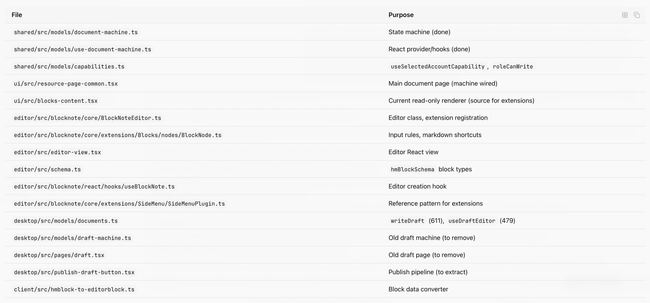
Key Reference Files
Do you like what you are reading? Subscribe to receive updates.
Unsubscribe anytime