


Problem
One of the most common actions in Seed is creating a new document inside an existing one. Until now, clicking "New Document" would take you away from what you were looking at — you'd land on a blank draft page, write your content, publish it, and then go back to the parent to see it appear as a card.
That flow works, but it breaks your context. You lose sight of the document you were working in, and the mental connection between "I want to add something here" and "here's where it lives" gets disrupted.
Solution
What's Changing
Starting now, when you click New on a document, the new subdocument appears right there — as a card at the bottom of the page you're viewing. No navigation, no context switch.
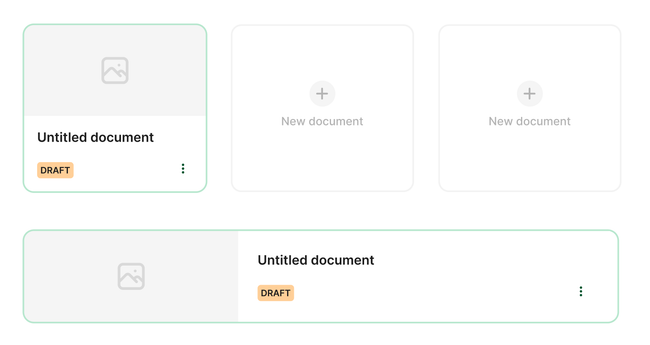
You'll see a new card with an editable title. Type the name of your new document directly on the card. When you're ready to write the full content, click the card to open the draft editor. When you publish that subdocument, it becomes a permanent part of the parent document — just like before, but without the detour.
How It Works
You're viewing a document. Maybe it's a project page with several sub-pages already listed as cards.
You click "New". A card immediately appears at the bottom with an empty title field, ready for you to type.
You name it. The title auto-saves as you type. This creates a draft that persists even if you navigate away.
You open it (when ready). Click the card or press Enter to go to the full draft editor. Write your content, add images, embed other documents — everything works as before.
You publish. When you publish the subdocument, it automatically gets embedded as a card in the parent document. The draft card is replaced by the real published card.
If you change your mind, you can delete the draft card at any time. Since the parent document isn't modified until you publish, there's nothing to undo.
Details That Matter
All your child drafts are visible. Whether you created a draft from the inline flow or from anywhere else, if it's a child of the document you're viewing, it shows up as a card. This gives you a clear picture of what's in progress under any document.
Drafts survive navigation. Leave the page, come back, restart the app — your draft cards are still there. They're not stored in temporary UI state; they're real drafts that persist until you publish or delete them.
No parent document changes until publish. The parent document stays exactly as it was until you publish the child. This means no accidental draft states on the parent, no "phantom changes" to discard, and no confusion about what's published and what isn't.
@horacio you should be able to:
edit the cover photo by hovering and edit the title and subtitle by clicking on it.
Delete the card on the 3 dots options
What's Next
This is the first step toward making document creation feel more natural and contextual. In future updates, we're looking at:
Reordering cards — drag subdocument cards to different positions within the parent
Richer inline editing — more than just the title, directly on the card
Scope
3 days
Rabbit Holes
TBD
No Gos
TBD
Photo by Arthur Franklin on Unsplash
Extras added by Bea
Duplicate a document in the same location a place it behind it
As a user you can edit a comment / As a user you can delete a comment
As a user you can discard a change on the 3 dots
As a user you can press ESC in the keyboard to discard changes and get back view mode
As a user you can publish content and that it brings you to where you were (now is losing context)
As a user when I press edit I want to be keep the place where I was (now is losing context)1
Improve publish modal: more high to buttons, more space between elements, more margin.
Do you like what you are reading? Subscribe to receive updates.
Unsubscribe anytime