


US-5.1 —As an editor, I want to click on a document and access editing options so that I can quickly modify it or perform contextual actions on it.
Acceptance criteria
The user clicks a subdocument to get into edit mode (same as clicking text)
The user can click the subdocument title at any time to open it.
The user can click the white area or the subdocument image at any time to select it.
The user can select more than 1 document at once and can copy document to paste it somewhere else
The user can hover over the document to understand if it is clickable.
The document just have 1 interaction which is click - no hover
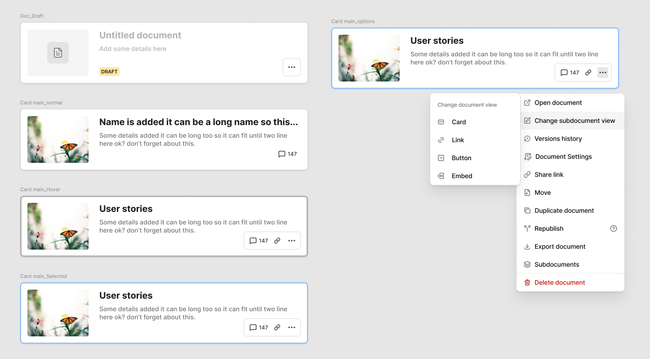
User can access all the options related to a subdocument accessing a contextual menu (3 dots) with options when is selected.
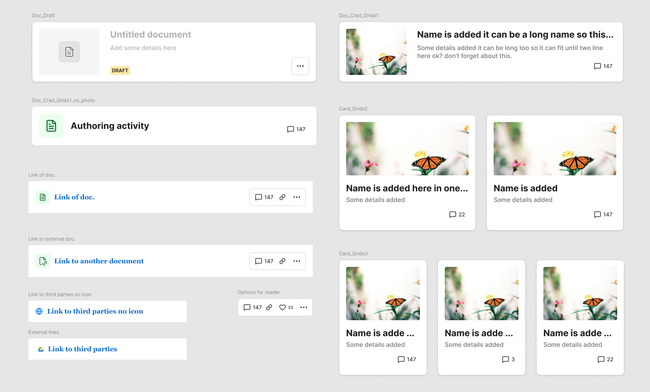
When a new document is created, keeps the horizontal format for the visualization→ Doc. draft
Basic Flow
User clicks and opens a document.
User finds a subdocument inside the parent
User can click the link to share the document
User can open comments of the document
User can open contextual options of the document
User can edit view of the document by selecting the option on the list options
UI considerations:
Keep cards horizontal but make the height shorter
When no image added we add a default document icon (see design)
We add a second line of text on the card format
I suggest to limit visualization options that are really useful
I suggest to differentiate between a link to an external doc. from a text/link visualization.
US-5.2 As an editor I want to change subdocument view so that I can design my subdocument the way I wish.
Acceptance criteria
The user can change view of a subdocument at any time by selecting it and the contextual options (3 dots)
The user can select between different view options on Change subdocument view.
Basic flow
The user navigates the document and find subdocuments
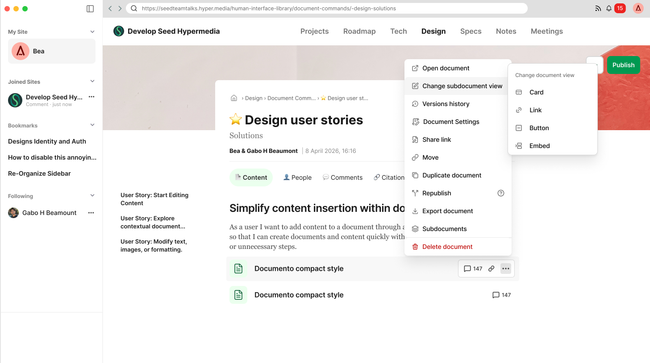
The user clicks the 3 dots button to see options
The user selects the option change subdocument view
The user selects the options their prefer
The subdocument view is automatically updated
Do you like what you are reading? Subscribe to receive updates.
Unsubscribe anytime