

Problem
The user needs a way to access the "Web of trust" features on web and desktop
Currently, these "following" features are only accessible on the contacts page on desktop, and it is not possible to access them from the site.
Definitions
Join
You have "Joined" a site when you have a Contact with:
Subject=<SITE_ACCOUNT_ID>
Subscribe.Site = true
Follow
You have "Followed" a profile when you have a Contact with:
Subject=<PROFILE_ACCOUNT_ID>
Subscribe.Profile = true
Design
Solution
Profile Navigation
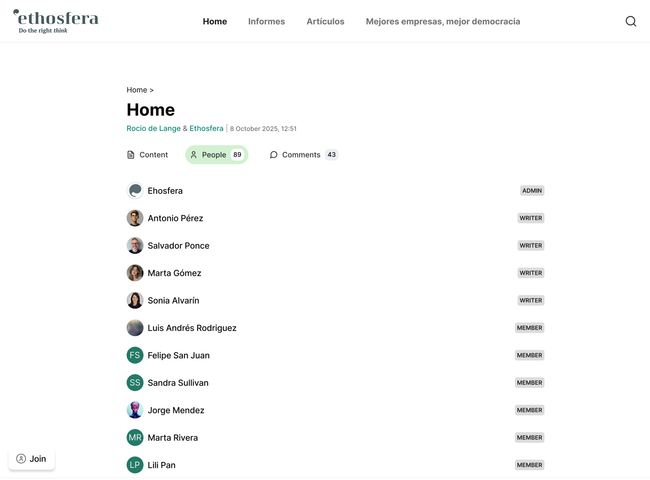
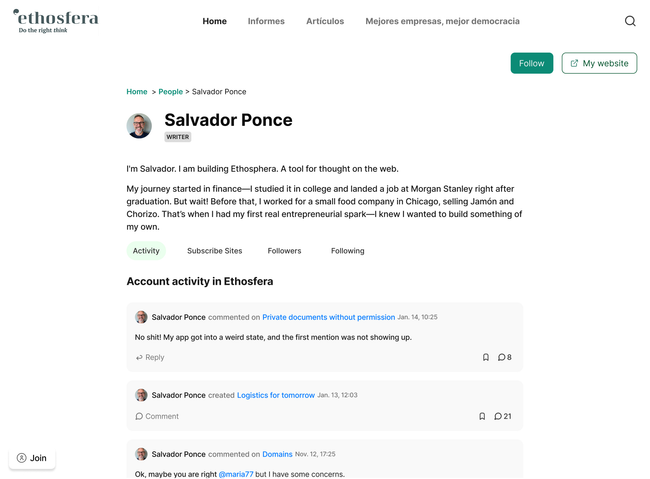
First, we need a way to access the profile page. All links to people from comments or activity will go to their profile, in the context of a site. As well as all members inside the "people" tab
The URL will be: <SITE_URL>/hm/<ACCOUNT_ID>/:profile
And, when you click on the owner, the URL will be <SITE_URL>/:profile
The profile page will have tabs that look similar to the document tools tabs.
The profile URLs will have the following sub-paths:
/:profile - Activity feed
/:membership - list of sites the account has joined
/:following - list of accounts the account is following
/:followers - list of accounts that follows this account
Contact Data Model
We will add a field on the Contact which describes if the user is following the account activity or is joined to the site.
The plan:
Subscribe.Site = true – The user has "Joined" the site (this is the default behavior for any contact that does not specify "Follow"
Subscribe.Profile = true – The user has "Followed" the profile/account
Both of the above – The user is both following the profile and has joined the site.
If "Subscribe" is missing on the contact (legacy contact), we will interpret it as "Following"
Joined+Following Sidebar
The sidebar will be changed to show these lists:
Joined - The list of sites that the user has joined. When you click on one of these, you go to the site.
Following - The list of accounts the user is following. When you click on one of these, you go to the profile. Any legacy contacts will show up here.
Bookmarks - (unchanged functionality)
Both of these lists are determined by reading the contacts
Currently the "subscriptions" is used to decide the items in the sidebar, but now we will use Contacts exclusively.
Join Button
For sites that you have not yet joined, you will see a "Join" button on the bottom left. When you click it, you will create the Contact with Subscribe.Site = true and if you are already following, your contact will be edited to include the "Site" in the Subscribe field.
If you are on web and you aren't already authenticated, you will see this button but you must Join first.
Auto Join on Comment
When you post a comment on a site that you have not Joined, you will automatically join it.
Follow Button
On the top right of the Profile screen (on all tabs), there will be a new "Follow" button which creates the Contact with Subscribe.Profile = true
If you are already following, you can remove the subscription in the ... dropdown of the Profile, either on the profile page, or in the following sidebar.
Profile/Sites Page
This is the list of sites that an account has Joined. It should show the full representation of the site (where it shows the recent activity and the 3 dot dropdown)
When you click on a site, it will take you to the home document
Profile/Followers Page
This is the list of Profiles(Accounts) that has followed a Profile.
When you click on a profile, it will take you to the profile page of that account.
Open question: which site do we open this profile on? For consistency on web, I guess we stay on the same site.
Profile/Following Page
This is the list of Profiles(Accounts) that is following this Profile.
When you click on a profile, it will take you to the profile page of that account.
Desktop Contacts Page
After this project, the Contacts page will not be needed. The "Web of Trust" will instead be shown by navigating the followers of the profiles.
As we have discussed, the "Edge names" feature will temporarily go away.
Joined Profiles appear in People Tab
For everybody who has "Joined", they will show up in the people tab. If they are not already a writer, they will show up as a "Member"
Scope
This requires a bit of work on the backend, and a lot of frontend work, including syncing and data models.
It could be done in one week of focused work
Do you like what you are reading? Subscribe to receive updates.
Unsubscribe anytime